
A Long Flight Preflight Checklist: Before You Start the Engine
The A Long Flight preflight checklist: reattach every detached part, fill the kerosene tank if needed, install the ignition last, then start the engine and take off.
Before A Long Flight lets you start the engine and take off, three jobs have to be finished on the plane itself: every detached part carried back and installed, the kerosene tank topped up if it isn't already full, and the ignition unit placed — the ignition always goes in last. Run through the checklist below in order and the engine will start from the pilot seat, ready to taxi to the takeoff road and go full throttle.
Checklist
- Reattach every detached part
Carry each part - both doors, the propeller, both main wheels, the tail wheel and the engine - to its blueprint on the plane, hold it there until the blueprint turns green, then press [F] to install it.
- Fill the kerosene tank if it isn't full
Hold a kerosene canister at the red fuel cap on the CARGO side of the fuselage and hold [R] to pour. If the tank readout already shows full, skip fueling.
- Install the ignition in the cockpit
Follow the yellow IGNITION waypoint, pick up the unit and press [F] to install it. The ignition always goes in last.
- Start the engine
Sit in the pilot seat with [E] and hold [M] - or look at the ignition and hold [M].
Put the detached parts back on
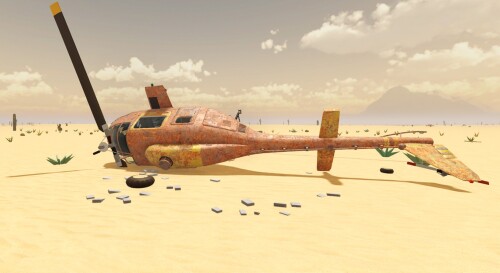
A fresh run starts with the plane — the tutorial calls it Rusty — taken apart: the right and left doors, the red propeller/nose cone, both main wheels, the tail wheel and the engine all lie detached nearby. If you're still getting oriented in the hangar, the first flight walkthrough covers the opening minutes in order.
The install loop is the same for every part. Pick the part up with [F], carry it to the blueprint that shows where it belongs, and hold it against the blueprint until it turns green, then press [F] to install it. If a part sits at an awkward angle, hold [RMB] and move the mouse to rotate it while carrying. Prompts such as "[F] to install the right door" appear as you carry the part into place.
You don't have to remember what's still off the plane. While any part is missing, a hint reads "Installed: 1 more parts are missing - put them back the same way", and each finished tutorial step is marked "DONE". Installed parts stay interactive too: the game shows an installed door offering "[F] hold to remove" and "[LMB] to open / close".
The engine installs at the nose with "[F] to install the engine". While you carry it, the part itself shows an oil readout, for example "Engine Oil: 8L/8L 26 °C".
Fill the kerosene tank if it isn't full
Fuel goes in on the side of the fuselage marked "CARGO", at the red fuel cap. Carry a kerosene canister there and hold [R] to pour. While you pour, two readouts keep you informed: how much kerosene is left in the canister (for example "Kerosene canister 16.6L/20L") and how full the tank is (for example "Tank 100L/100L"). If the tank readout already shows full, filling is skipped and you can move straight to the ignition.
Install the ignition last
One part has a fixed spot in the order: the ignition goes in after everything else is back on. The game says it directly: "Now put the ignition back in - it goes in last. Then you can start the engine." Follow the yellow IGNITION waypoint to the unit, pick it up, and press [F] to install it in the cockpit.
Start the engine and take off
With the parts on, the tank topped up and the ignition in, sit in the pilot seat with [E] and hold [M] to start the engine — or look at the ignition and hold [M]. The engine start guide covers this step in more detail. From there, taxi to the takeoff road and go full throttle. If you want the whole trip spelled out, the first flight walkthrough follows a complete departure, and the takeoff and flying guide covers the flight itself.
Related Guides
First Flight Walkthrough
Set up a Survival run, rebuild the plane in the hangar, fuel it and take off from the road, step by step.
How to Take Off and Fly
Taxi to the road, go full throttle and fly the radar road to your next stop to land, loot and refuel.
Desert Dangers
What interrupts long flights — zombies, lightning, tornadoes and hard landings — and how to prepare for the desert stretch.