
A Long Flight Scavenging Guide: Where to Land and How to Grab Supplies
Where to land and search in A Long Flight: gas stations for kerosene, abandoned buildings for survival supplies, plus how to clear zombies and grab loot.
Quick answer
Land at the abandoned gas stations and buildings along your route: gas stations hold kerosene canisters for the plane plus water bottles and food, while buildings and houses hold survival supplies like water, medicine, bandages, weapons and med kits. Stop the engine, kill the zombies at the site, look at each item and press [E] to take it, then stow everything in the plane's cargo room before takeoff.
In A Long Flight, every supply you need — fuel for the plane, water and food for yourself — comes from the same activity: landing at the abandoned locations scattered along your route and searching them. Here's where to stop and exactly how grabbing supplies works.
Where to land for supplies
The game's own description sets the loop: search abandoned locations, discover useful supplies, and keep your airplane in working condition. Along your route, two kinds of sites are worth a landing — brush up on how to take off and land first if you need to:
| Where to stop | What players found inside |
|---|---|
| Gas stations | Kerosene canisters — the type of gas planes run on — plus water bottles and food. Multiple stations appear along the route, and one player found about three canisters at a single station. |
| Abandoned buildings and houses | Water bottles, medicine, bandages, a weapon, a med kit, a pilot ration, soda, food and a flashlight. Contents vary from building to building, and some hold little of use. |
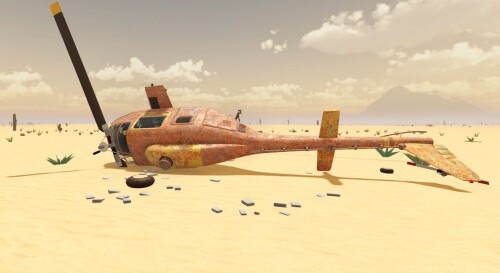
Gas stations are your fuel stops: kerosene canisters turned up at the stations players checked, so they're the reliable place to land when the tank runs low. Buildings and houses cover everything else, and they're not all bare — one player even ran into a house that looked good enough to spend the night in. The abandoned locations guide covers more of what's out there.
Your routine at every stop
Every searchable site is guarded by zombies, and they respawn over time, so each stop follows the same short routine:
Checklist
- Land next to the site
Set down close enough to walk to the entrance; if the touchdown goes badly, you can take off and try again.
- Stop the engine
Shut the plane down before you head off to look for loot.
- Clear the zombies
Kill the zombies around the site and any hiding inside before you start grabbing items.
- Search fast, then leave
Zombies respawn over time, so don't linger once a building is emptied — take what you found and take off.
How to pick items up
Ordinary loot is simple: look at the item — on the floor, a table or a shelf — and press [E] to pick it up. Press [Q] to drop whatever you're holding, and you can look at a dropped item and press [E] to pick it back up. The tutorial teaches these prompts with the pistol, and the same look-and-press pickup works on the supplies you find at sites.
Kerosene canisters get their own controls. Press [F] to pick one up — canisters show their contents right on the label, like Canister 16.6L/20L — and while you're carrying it you can press [F] to drop it, [R] to drink from it, or [Q] to attach the canister straight to the plane. Players used both routes to get fuel aboard: attaching canisters to the plane or carrying them into the cargo room. The full key list lives in the controls guide.
Stow it all in the cargo room
Loot only helps if it's aboard when you leave. Players load kerosene, water, food, soda, a med kit, a flashlight, a tool box and a spare wheel into the plane's cargo room and close the door before taking off. The split is simple: kerosene canisters are fuel for the plane, while water and food restore your pilot's survival stats like thirst — the longest flight guide covers those meters in more depth.
What to skip at a site
Two time-wasters are worth recognizing:
- Props that look searchable but aren't. A rusty car parked beside a gas station turned up nothing useful for the player who checked it, so don't count on every prop paying out — the buildings themselves are the dependable target.
- Containers that won't open. Players couldn't get a fridge, a cabinet, an office door or a locked closet open. If a door or container refuses to open, leave it and move on — the useful loot sits out in the open on shelves and floors.
Once the cargo room is full and the tank is topped up, close the door and fly on to the next site. New to the game? The first flight walkthrough covers getting started, from building the plane to your first takeoff.
Related Guides
Abandoned Locations
Every abandoned site type, how to reach each one by plane and the kerosene, water and medicine it holds.
Dangerous Locations
Where zombies, unknown liquids, tornadoes and lightning appear, and how to explore each dangerous place and survive.
How to Take Off and Fly
Taxi to the road, go full throttle and fly the radar road to your next stop to land, loot and refuel.